

Redaman is a well-known banking malware, discovered around 2015. Recently I have been analyzing a recent version of the malware (0.6.0.2, not sure if latest version, probably one of the newest). This malware uses some interesting tricks probably introduced in these recent versions. In this post I share some notes about the analysis.
Original Packed Sample: 2b251483ed7705c60ee12b561280a1fc
Unpacked Sample (dll): 2a298a650b50eb89041548e57d72f726
Virustotal First Submission: 2019-10-11 10:35:13
Related links:
Analysis
1. Anti-analysis tricks
1.1. C2 encoded into bitcoin transactions
1.2. Checks machine name vs user name
1.3. Encrypted strings
1.4. Unpacked module needs correct argument to work properly
1.5. Checks for typical sandboxes files, directories, processes...
1.6. Checks for security products
1.7. Disable Safeboot
2. Bot commands and malware capabilities
3. Yara rules
4. List of encrypted strings
1. Anti-analysis tricks
1.1. C2 encoded into bitcoin transactions
This trick, discovered by checkpoint and explained in this post, is really interesting. The malware gets the C2 addresses from the bitcoin blockchain. The malware doesn't carry C2 addresses into the binary. It carries (in the list of encrypted strings) some urls of some services offering APIs related to bitcoin blockchain:
"viabtc.com"
"/res/btc/transactions/addressv2?address="
"api.blockcypher.com"
"/v1/btc/main/addrs/"
"?limit=10"
"blockchain.info"
"/rawaddr/"
"blockchain.coinmarketcap.com"
"/api/address?address="
"&symbol=BTC&start=1&limit=10"
Additionally, it carries another encrypted string with the C2 schema, a bitcoin address and the C2 uri:
"http://1N9ALZUgqYzFQGDXvMY5j1c7PGMMGYqUde/index.php"
Then, the malware composes the blockchain API url, and queries the transactions for the given bitcoin address, for example:
https://api.blockcypher.com/v1/btc/main/addrs/1N9ALZUgqYzFQGDXvMY5j1c7PGMMGYqUde?limit=10
(Find a copy of the json response here: https://pastebin.com/rC9pF2F2)
The malware uses some fields of this json response (exactly the values of the transactions) to compose the C2 addresses, as explained in the following image (click on the image to expand):
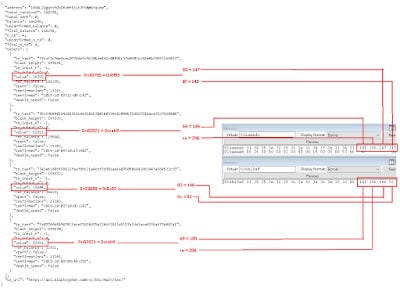
The threat actor only needs to perform some new transaction with the given bitcoin address to update the C2 list.
This is quite interesting. A malware could be keeping all kind of information and configs in the blockchain. It could use these APIs such as api.blockcypher.com, etc... or it could download the blockchain to get all the transactions directly from the blockchain and recover all the needed information.
A domain can be sinkholed, but, using this method, it would be hard to forbid the malware to get updates.
1.2. Checks machine name vs user name
This is another trick, quite aggresive, that I hadn't seen before. Basically, the malware gets tthe computer name and the user name. It removes the "-PC" suffix from the computer name, the in compares the computer name (without -PC) with the username (uppercase). If they are the same, exit.
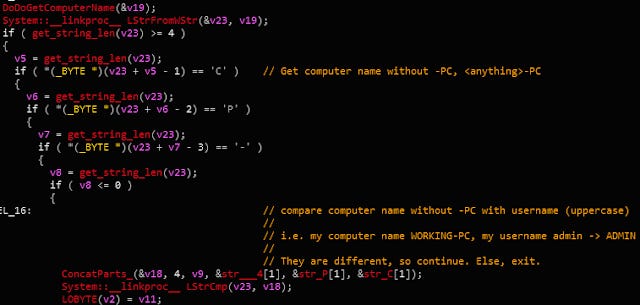
Frequently, real usual users' machines have computer names like DESKTOP-JMP24OS, etc... I suppose with this aggresive trick the malware tries to avoid being executed in sandboxes, AV emulators, etc...
1.3. Encrypted strings
As explained at welivesecurity' article, the malware decrypts the strings that it is going to use by using a custom rc4 algorithm.
Here, Im just going to explain how I got the decrypted urls directly from memory and Im going to share the script that I used to add IDA comments automatically. I used the following Windbg commands to dump all the decrypted strings and their positions in the strings' table:
bp <base_unpacked_mod> + 291F5 (at this point, strings were decrypted a moment ago)
Print decrypted ascii strings:
.for ($t0=0;@$t0<0x18b;r $t0=@$t0+1){ .printf "%d ",4*@$t0; da poi (<base_unpacked_mod>+2C93C+4*@$t0); .printf "\r\n"; }
Print decrypted unicode strings:
.for ($t0=0;@$t0<0xb6;r $t0=@$t0+1){ .printf "%d ",4*@$t0; du poi (<base_unpacked_mod>+2CF68+4*@$t0); .printf "\r\n"; }
With these commands, i got the list of strings (ascii and unicode), and I used the following IDA python script to set comments foreach part of the code where these strings are being used:
1.4. Unpacked module needs correct argument to work properly
Once the malware is unpacked, the real redaman dll is launched with rundll32 and DllGetClassObject method is called, and an argument is given:
rundll32 <redaman dll path>, DllGetClassObject <password>
The given password needs to be correct, if it is not correct, the encrypted strings cant be decrypted and the malware exits.
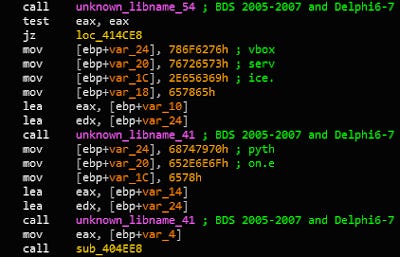
1.5. Checks for typical sandboxes files, directories, processes...
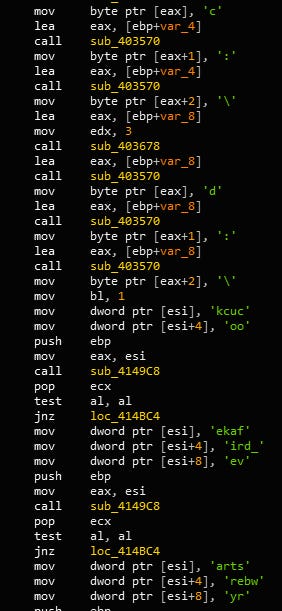
It checks for the following files or directories at c:\ or d:\ : cuckoo, fake_drive, strawberry, tsl, targets.xls, perl, wget.exe
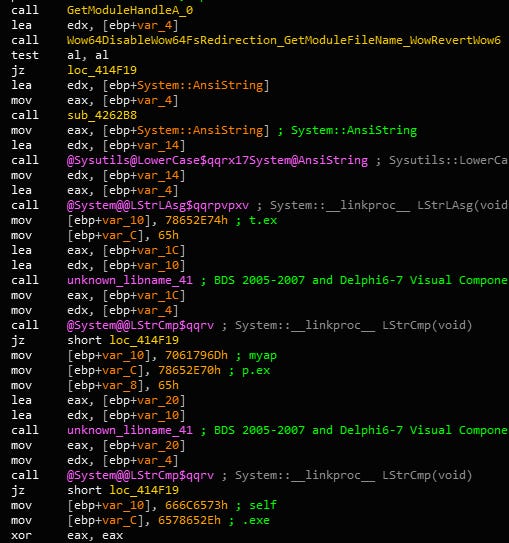
It checks for the following names in the own module name: myapp.exe, self.exe, t.exe
And for the following processes: vboxservice.exe, python.exe
1.6. Checks for security products
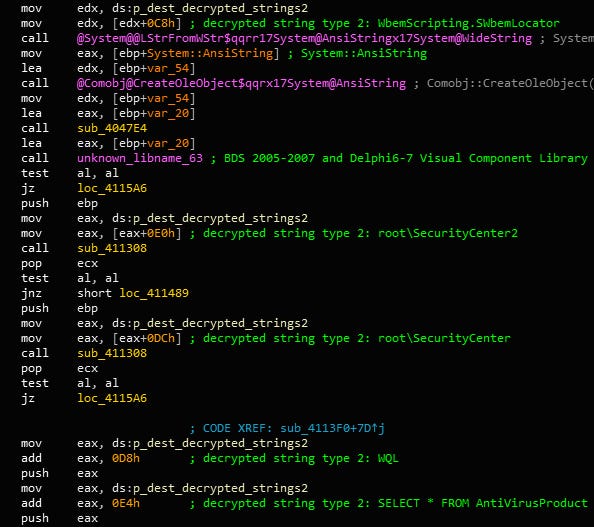
Redaman uses the WbemScripting.SWbemLocator API to search for intalled security products:
1.7. Disable Safeboot
The malware deletes the current safeboot value:

2. Bot commands and malware capabilities
I recommend to read the welivesecurity' article to learn about the protocol and encryption used by Redaman banking malware.
It looks in the newer versions of the malware they have introduced a much longer list of commands that the bot can receive from the C2 and execute. This is the complete list (each command and name is quite self-explanatory):
keylogger.last-data
keylogger.last-wnd-caption
keylogger.last-exe-path
botnet-prefix
botnet-id
cc.connect-interval
scan-files
post-install-report
cc.url
modules.
modules-data.
del-module
unload
uninstall
uninstall-lock
find-files
download
shutdown
reboot
cc
get-cc
botnet-id
prefix
connect-interval
hosts-add
hosts-clear
dbo-scan
cfg-set-str-a
cfg-set-str-w
cfg-set-dw
cfg-get-str-a
cfg-get-str-w
cfg-get-dw
cfg-del-param
screenshot
dns
set-dns
get-dns
kill-process
lpe-runas-flags
scards.monitoring-interval
auto-elevate
reload
scard-off
modules-off
dbo-detector-off
multiinstance-off
keylogger-off
dns-servers-changed
hosts-file-changed
video.refresh-interval
video-start
video-stop
del-files
Additionally, in the list of encrypted strings, the malware carries a list of strings to match against the browser window name. In case of match, it is a target site (most of them bank websites) to steal credentials from. This is the list of urls of the analyzed sample:
online.payment.ru
bankline.ru
/ic/login.zhtml
/servlets/ibc
faktura.ru
/iclient/
ibank2
bco.vtb24.
bo.vtb24.
dbo.vtb.
elbrus.raiffeisen
elba.raiffeisen
handybank.
wupos.westernunion
online.sberbank.
minbank.ru
e-plat.mdmbank.
link.alfabank
click.alfabank
ib.avangard
ibc.vuzbank.
ibc.ubrr.
my.modulbank.
online.centrinvest.
cb.mtsbank.
vbo.mkb.
i.bspb.ru
i.vtb.ru
bc.rshb.
/vpnkeylocal
sci.interkassa
ibank.mmbank.
blockchain.info
/wallet/
cb.asb.by
bps-sberbank.by
dbo2.bveb.by
ibank.bsb.by
corporate.bgpb.by
ibank.alfa-bank.by
ibank.belinvestbank.by
ib2.ideabank.by
client.paritetbank.by
ibank.priorbank.by
client.mybank.by
online.stbank.by
client.belapb.by
Unk
SberBank_PC
BSS
BSS_PC
iBank2_PC
Faktura
PCB
InterPro
RosBank
SBBO
INIST
Inversion
Interbank
iBank2
BiCrypt
VTB24
1C
SGB
Raiffeisen
HandyBank
WU
SB_Fiz
CFT
WinPost
SBIS
ClBank
QiwiCashier
ISCC
WebMoney
xTC
iFOBS
TRANSAQ
OSMP
MinBank
SFT
MDM
ALBO
Alfa_Fiz
Avangard
Intercassa
Amikon
Vuzbank
UBRR
ModulBank
CentrInvest
MTSBank
MKB
EL_CLI
BSPB
IVTB
RSHB
Infocrypt
MMBank
BlockchainInfo
HBClient
ASB
BPS_SB
BVEB
BSB
BGPB
ALBO_BY
BelInvest
IdeaBank
Paritet
PriorBank
MyBank
StBank
BelAPB
scDBO
AvestCSP